This is a continuation of my recent post about Long-running agent workflows. That post was a survey of the problem and solution space. Today I want to talk about:
- How I currently do AI-assisted development in a “devbox” in the cloud.
- The devbox repo that uses pyinfra to automate provisioning of devboxes with my stack.
My current stack
As always with AI-assisted development, things are moving quickly and this post is liable to be outdated before too long. But I think it’s a useful snapshot of my current process.
My current stack of tools is as follows. Note that I tried to prioritize open-source tools that limit vendor lock-in. Claude Code is an obvious exception that might eventually be replaced.
| exe.dev | Hosting | Cloud-based VM hosting with reasonable prices for always-on VMs, plus useful GitHub integration and easy automation. Relatively interchangeable with any other cloud hosting (Fly, Digital Ocean, EC2, etc.) |
| Paseo | Orchestrator | Self-hosted, desktop/mobile/server compatible agent orchestrator. Paseo is the core of the workflow. It provides the same features as “all-in-one” orchestrators with built-in cloud functionality, but open-source and without vendor/agent lock-in. |
| Tailscale | Networking | Dead-simple VPN that makes it easy for nodes (i.e. my desktop, phone, and devbox server) to communicate. Relatively interchangeable with other VPN solutions, e.g. nebula. |
| Claude Code | Agent | I currently use Claude Code as my main agent. However, the above stack is also generally compatible with OpenCode, Pi, Codex, etc. |
| smolvm | Isolation | microVM isolation for agents running in the devbox. In Paseo, you can choose to use a microVM or not on a per-workspace basis. |
The pieces combine like this:
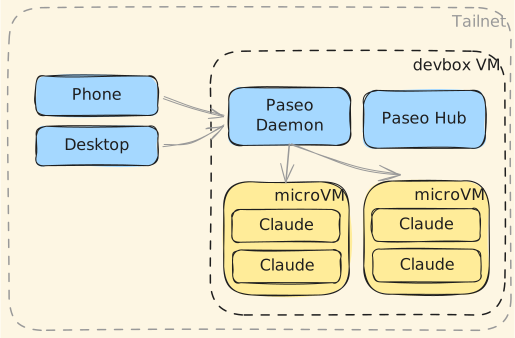
Paseo has a E2E encrypted relay service and a Hub for receiving webhooks and some other features.
I don’t want to rely on any Paseo services running outside my VM, so I don’t use the relay (relying on Tailscale VPN for connectivity instead), and self-host the hub.
This approach leans heavily on Paseo, which is an open-source orchestrator with important features:
- Multi-platform (Windows/OS X/Linux/iOS/Android/Web/Server) means you can run Paseo wherever you need it. In my case, I use Windows and Android. Many other orchestrators don’t provide support for those platforms at all.
- Ability to view files and launch terminals on the remote devbox host. This makes Paseo viable as a full control plane instead of just an agent orchestrator.
- Support for multiple projects (separate GitHub repos), each with multiple workspaces (parallel worktrees).
- Support for schedules, which will be important once I start messing with loop engineering more.
- The built-in speech-to-text conversion is actually quite great, which is helpful when interacting with the agent on my phone.
Paseo replaces my previous lightweight “orchestrator” approach with herdr/mosh/moshi and also removes the need for claude rc.
But, Paseo isn’t a one-stop solution. Nor should it be — as a free, open-source, self-hosted tool, I expect it to require some scaffolding to be able to run on my own cloud VM. And it doesn’t have any built-in sandboxing for agents, which is why I add my own claude-vm provider that supports running Claude inside a microVM. Is microVM sandboxing strictly required? Not sure, but it makes me feel better.
Also, there are some networking concerns. I don’t want the microVM containers to have access to the tailnet. Also, I don’t want the entire VM to be exposed to the public. So, we use a combination of firewall rules, VM settings, and a Caddy reverse proxy to ensure that VMs are isolated from the private network and the only thing exposed to the public Internet is the Paseo Hub webhook route for incoming HTTP webhooks.
So how do we wire all these things together easily and repeatably? I chose to have an agent write idempotent setup scripts using pyinfra. Let’s talk about that now.
Devbox repo
The devbox GitHub repo contains Pyinfra scripts for provisioning and managing a cloud-based “devbox” with the stack described above.
There are three main commands at the moment:
provision | Creating a new exe.dev VM, connecting it to your tailnet, and provisioning it with Paseo, Paseo Hub, Claude Code, and a microVM provider. |
add-repo | Integrates with a new GitHub repo in your exe.dev account and adds it as a new project in Paseo. |
hub install | Adds optional Paseo Hub component from the devbox (use hub uninstall to remove). |
For example, to spin up a devbox and enable support for the luketurner/example repo, you just need two commands:
uv run devbox.py provision
uv run devbox.py add-repo luketurner/example
Note that you need to have some settings in a local/config.toml file, including a Tailscale auth key, a Claude access token, and a username/password for the Paseo Hub.
There are considerably more details in the README. Be warned that the repo, including the README, is mostly written by AI.
Although the intent of the devbox script is to run a single VM with sandbox microVMs for project workspaces, it can also be used to provision a separate devbox per project. Paseo supports both use cases equally well.
