Table of Contents
Introduction
Lately I’ve been dealing with longer agent sessions (multiple hours) implementing complex tasks. I’ve also heard about so-called loop engineering which seems like an interesting iteration on AI-assisted development that I’ll be wanting to experiment with.
Therefore, I’m interested in patterns for running long-term sessions and “loops”.
By the way… what is it with incremental improvements in AI-assisted development being hyped up as “XYZ engineering”? Prompt engineering, context engineering, harness engineering, loop engineering, etc.
I appreciate the importance of giving a catchy name to an idea in order to drive adoption, but still. Is “loop engineering” really that different from what e.g. Devin AI was trying to accomplish back in 2024?
Anyway, I digress. Names aside, so-called “loop engineering” has clear utility (IMO) and is worth experimenting with.
My personal computer isn’t suitable for this — I don’t want to leave it on 24/7. And while I could deploy a server in my home that’s fit to purpose, I’d prefer a cloud solution that doesn’t require up-front expenditure and long-term maintenance.
Additionally, I want my main point of entry for interacting with my agents to actually be my phone, with my desktop as a fallback for more complex tasks like diving into the code, kicking off major new features, etc. This imposes a unique set of requirements on a development environment.
Background
I first ran into this need when I started using the superpowers plugin with Claude Code.
In my experience, Superpowers raises my agents’ autonomy, allowing them to deliver higher-quality results on larger features, but at the cost of extra time and tokens. Sessions with Superpowers were suddenly taking multiple hours, with intermittent user input (answering questions, approving plans, etc.) during the process.
I could say a lot about why the patterns in Superpowers are useful, but that’s another post. For now, just think of it as a batteries-included toolkit with spec-writing, TDD, automated review, subagents, and more.
My previous workflow of running in Podman/Codespaces started to feel cramped. I would have to check my computer regularly throughout the day, and sessions would get interrupted regularly (I like to turn my computer off at night) and need to be manually resumed.
I came across this talk: Anthropic’s Boris Cherny: Why Coding Is Solved, and What Comes Next where Boris shows his personal workflow for coding (timestamp link). I was struck by how he manages long-running sessions from his phone. This looked better than hovering around my computer all day to see if the agents need me for something.
So, I decided to figure out a new development workflow that let me manage long-running sessions from my phone.
Requirements
At first I thought, I’ll just use Claude Code on the Web’s built-in cloud environments feature (which Boris is presumably using). But that didn’t exactly fit my needs, as I’ll explain later.
So then I took a step back. What are my needs?
- Long-running sessions: Should be able to run a single session “indefinitely” (hours, days, weeks) without interruption.
- Resuming sessions: Should be able to resume sessions if they do get interrupted.
- Manage from phone: It should be possible to interact with the sessions from my phone. I should also receive notifications when a session is waiting for user input.
- Full control: I should have full control of the “execution environment” for my agent — VM/sandbox/etc. Importantly, I need to be able to access it outside the agent (e.g. opening files in VS Code, interacting via terminal). The environment should be something I can understand with a simple lifecycle and minimal “magic.”
- GitHub access: The environment should be able to push/pull Git repositories from GitHub, and also interact via
ghCLI (e.g. to create pull requests). - Agent-agnostic: As much as possible, the workflow should be agent agnostic. I shouldn’t need to rebuild everything from scratch to switch agents. (This is a sliding scale.)
- Cost-effective: Should cost $20/month or less. (This is not a hard requirement.)
- Platforms supported: Must support the platforms I care about: Windows, OS X, Android.
Tools and Products
Of course, I’m not the only one interested in this workflow. There are more than a few options out there, from tried-and-tested options to brand-new, agent-focused ones.
This section is a brief survey of some tools in the space, or at least the ones I’m aware of, organized into loose categories.
I also highlight a “winner” in each category. This isn’t meant to be an objective choice. The winner is simply the option that I’m actually using for my own stack.
One-stop shop
These products are designed to solve the whole workflow end-to-end.
One-stop shop tools are characterized by having an agent-aware UI with integrated first-party cloud hosting.
- Claude Code on the Web
- Integrated into Claude Code, no extra work or additional costs over Claude subscription.
- Strictly tied to Claude Code. Can’t access containers outside of Claude.
- Boxes.dev
- Promising end-to-end workflow out of the box. Includes a full-fledged mobile app as well.
- No Windows support.
- Conductor
- Another promising end-to-end workflow.
- No Windows or Android support.
- Hermes Cloud
- An interesting agent with optional built-in cloud backend.
- No mobile app support except via Termux.
Winner: None. None of the one-stop shop options meet all my requirements, so I don’t use any of them.
Lightweight cloud hosting
If you’re not using a one-stop shop with first-party cloud hosting, you’ll need a way to host your long-running agents yourself.
Most lightweight cloud hosting options are undifferentiated (meaning, any of the below could work just fine).
- exe.dev
- Easy-to-configure cloud VMs with predictable monthly pricing and useful integrations.
- Plans start at $20/mo
- Smolmachines
- Lightweight VMs that can run locally or in the cloud.
- Actually quite expensive if you want to leave them running 24/7 (e.g. for
claude rc).
- Fly Sprites
- Lightweight cloud-based containers that turn off when you’re not using them (but can be kept on with an API).
- Also fairly expensive for 24/7 usage.
- Fly machines
- Lightweight cloud-based containers that support launching from a Dockerfile (that gets automatically built into an image in the cloud).
- Relatively cheap for smaller machines, but decent CPU+RAM gets expensive.
Other options include traditional cloud hosting, like AWS EC2, GCP Compute Engine and Digital Ocean Droplets.
Winner: exe.dev. $20/mo predictable monthly pricing for 50 VMs is actually much cheaper than the pay-as-you-go model if you want to keep them running 24/7. Also, the easy-to-use GitHub integration simplifies devbox setup.
Multiplexers / UIs
Multiplexers manage multiple agent sessions at once and support being accessed by different connections. For example, you could launch a Claude Code session from your desktop computer, and reconnect to it later from your desktop or your phone.
- Herdr
- A very new multiplexer designed specifically for managing coding agents.
- See also Collie which provides a mobile-friendly Web UI for Herdr.
- Zellij
- Newer multiplexer with built-in plugin system, Web client for accessing sessions remotely, and more.
- Tmux
- Very popular multiplexer, often comes pre-installed or available in package repos. I would recommend choosing tmux over GNU Screen, although the latter is even more ubiquitous.
- Pi Web
- A mobile-friendly web-based UI for the Pi coding agent, that also includes Git, file viewing, terminals, etc.
- Superlogical
- A promising team, but no public product yet.
Honorable mention in this category goes to the claude rc command, which allows you to remotely control up to 32 sessions at once.
More about claude rc in the next section.
Winner: Herdr. I like trying new tech. It’s cool how herdr integrates with coding agents, even though I don’t really need that functionality. That said, Zellij/Tmux would be totally fine here too.
Remote connectivity
So you have your VM running in the cloud. How do you access/manage it?
- Claude Code remote control
- Claude’s suite of remote-control commands, especially
claude rc, allow you to use the Claude desktop/mobile/web apps to fully manage your Claude Code sessions, including kicking off new ones. - Does not allow full access, e.g. to read files or execute terminal commands (unless you ask the agent to do it, of course). Not recommended as the primary access point, but good in combination with SSH/mosh.
- Claude’s suite of remote-control commands, especially
- Standard SSH
- Typically you can access your VM via standard SSH, e.g. using openssh or PuTTY. Not much to say here.
- Moshi
- Mobile app for connecting to servers via SSH or Mosh and supports agent-specific features like custom hooks. Also integrates directly with some multiplexers.
- Termux
- Android app that includes a terminal emulator and full Linux environment including
ssh.
- Android app that includes a terminal emulator and full Linux environment including
- VS Code Remote SSH
- Use VS Code to connect to your remote host over SSH to view files, launch terminals, etc. (Many other editors also support editing over SSH, including Vim, Emacs, Zed, etc. — use your editor of choice.)
- Tailscale
- Easy-to-use VPN tool for exposing services privately (e.g. test servers, etc.). Includes both desktop and mobile apps.
Winner: Claude Code remote control, Moshi, VS Code Remote SSH, Tailscale. I use claude rc to manage my sessions via Claude apps, Moshi to directly connect from my phone, and VS Code to directly connect from my computer. Tailscale is useful to simplify SSH setup, exposing private services, and allowing mosh to work for mobile access.
Development environment configuration
You don’t want to have to manually connect to each sandbox and set up all your dependencies each time. These are tools for managing that more automatically.
- Ansible
- A powerful (if complicated) tool that can automate pretty much any setup task and can run on remote hosts over SSH.
- Mise
- Manages dev environment dependencies based on declarative files or CLI commands. See also asdf as a more focused alternative.
- Bash scripts
- Good old Bash (or zsh, fish, etc.) scripts are a low-dependency option for automated setup. Pretty much every provider supports them, even highly limited ones like Claude’s cloud environments. They can be difficult to write and manage, but your coding agent can help with that.
- Just use your agent
- One interesting option is to just write a prompt (or a custom skill, etc.) for your agent to understand how to set up your development environment.
Winner: Mise, Bash. Mise is nice for declaring project-specific dependencies. Bash is good enough for initial VM provisioning.
CI/CD
I include this section because CI/CD tooling is an important part of enabling end-to-end app development from your phone.
You don’t want to have to manually run commands to build and release your app each time the agent ships some code to main. With a CI/CD pipeline, all you have to do is merge a PR or push the main branch to a remote, and a new release of your app is ready for integration testing.
I generally use GitHub Actions for side projects, but whatever CI/CD pipeline you choose is probably just fine.
Winner: GitHub Actions. Convenient and integrated with GitHub.
My Current Workflow
I currently use the following tools:
- exe.dev for running VMs in the cloud.
- Herdr for creating long-running tasks (but I mostly just have a single session that runs
claude rc). claude rcfor creating and managing Claude sessions remotely, e.g. from the Claude app on my phone.- Moshi for connecting to the VM directly from my phone if I want to run remote commands directly.
- GitHub for repository hosting and GitHub Actions for CI/CD.
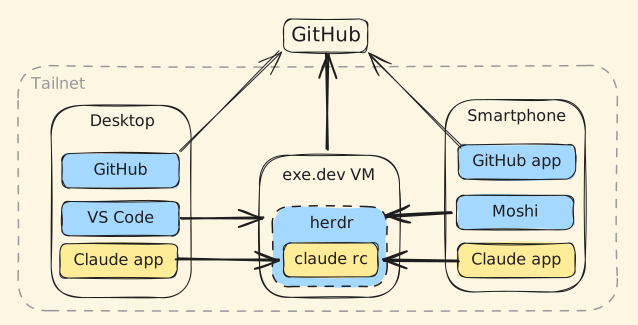
Getting started with a new repo looks like this:
- Create the repository in GitHub.
- Configure exe.dev’s GitHub integration to grant access to the repo to my VMs.
- Spin up a new VM (
ssh exe.dev new --tag my-repo-name) - Provision the VM (install dependencies, clone Git repo, etc.)
At this point the remote development environment is ready to go:
- Create and manage sessions for the repo from Claude desktop/web/mobile apps.
- Connect via Moshi for terminal access from my phone. Uses Mosh for persistent sessions.
- I can open the remote folder in VS Code for a more traditional IDE-like development experience.
- Access development servers from desktop/mobile via Tailscale.
I’m still working on refining my process, especially step (4) — provisioning the VM. Future posts to come with more details once I have more experience with the new workflow.
